Turn any RFP into a compliance matrix in minutes

Automated Triage — Paste a SAM.gov link or upload the solicitation PDF. RFP Triage fills in the opportunity details, pulls every requirement into a compliance matrix, and flags what changed when an amendment drops.

AI Defense — protects your proposal from the errors AI introduces.

One SAM.gov link. One compliance matrix. Under a few minutes, start to finish.

Every requirement extracted into a reviewable matrix — organized by type, tagged by disposition, ready to assign.

Every requirement extracted into a reviewable matrix — organized by type, tagged by disposition, ready to assign.

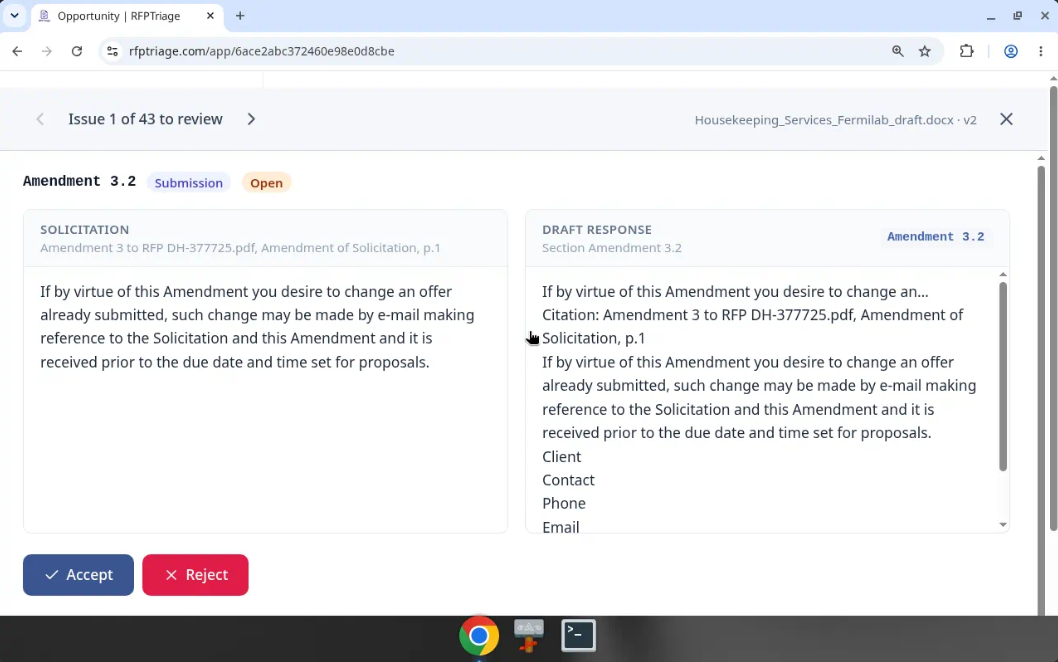
Draft Review checks your draft against each requirement, side by side, so nothing slips through unanswered.

Draft Review checks your draft against each requirement, side by side, so nothing slips through unanswered.

Automatically detects if AI injects undetected changes.

Automatically detects if AI injects undetected changes.

A compliance matrix shouldn't take a full day.

Reading Sections L and M line by line. Copying "shall" statements into a spreadsheet. Cross-checking page numbers. It eats a day you don't have.

RFP Triage pulls the requirements into a matrix for you. You review and adjust instead of starting from a blank sheet.

AI wrote it. Can you trust it?

AI drafts fast, and it also quietly rewrites things. An answer you already approved gets reworded, a commitment changes, and nobody catches it before submission.

RFP Triage locks your approved answers. If AI changes one, it's flagged instantly with the exact difference and goes back for human reapproval.

Every amendment changes the rules.

An amendment lands three days before the deadline. A requirement shifts, a page limit changes, and someone on the team is still working from the old version.

Load the revision and RFP Triage checks it against the matrix you already have. You see exactly what changed, so nothing slips through on submission day.

How it works

1

Add the opportunity.

Paste a SAM.gov link or upload the solicitation PDF. The opportunity details fill in on their own.

2

Get your compliance matrix.

RFP Triage extracts the requirements into a matrix you can review, edit, and assign.

3

Export and get to work.

Download to Word, PDF, Excel, or CSV. When an amendment comes out, load it and check what changed.

Try it free on your next bid

2 opportunities free, no card

Who it's for

RFP Triage is built for small GovCon firms with 1 to 20 people. Not sure if it fits? Try it on a real solicitation. Your first 2 opportunities are free.

  • Small businesses bidding federal work that don't have a dedicated proposal team.
  • Owners and BD leads who write proposals between everything else.
  • Lean proposal teams that need to triage more bids without adding headcount.
  • Consultants and freelance proposal writers who build matrices for several clients.
  • Firms bidding state and local work, too.
DA

Hi, I'm David Altfeder.

I've spent more than 20 years managing proposals for federal, state, and local bids. I've built more compliance matrices by hand than I can count.

I know the late nights. I know the sinking feeling when an amendment drops two days before the deadline. And I know the fear of letting AI draft your proposal, never quite sure if it quietly injected an error you won't catch until the evaluator does.

I built RFP Triage to do the part of the job that shouldn't take a day, and to stand between you and that fear. It gives you a solid first matrix in minutes, then AI Defense checks your draft against every requirement, so you can spend your time on what wins: a clear, compliant, convincing proposal.

I'm based in Pinehurst, North Carolina, and I still read every message that comes in. If something doesn't work the way you need, tell me.

— David Altfeder, Founder, RFP Triage

Pricing

Simple pricing. Pay for the bids you work.

Annual billing saves 2 months — $490/yr Starter, $1,490/yr Pro.

Free Trial

$014 days

  • 2 opportunities
  • 14-day trial
  • No card required
  • Compliance matrix + verification
  • Draft Review
  • Score trend tracking
  • CSV / PDF / Word export
  • Extra opportunities at $15 each
Start free trial

Starter

$49/mo

  • 5 opportunities per month
  • Compliance matrix + verification
  • Draft Review
  • Score trend tracking
  • CSV / PDF / Word export
  • Extra opportunities at $15 each
Choose Starter

Pro

$149/mo

  • 20 opportunities per month
  • Compliance matrix + verification
  • Draft Review
  • Score trend tracking
  • CSV / PDF / Word export
  • Extra opportunities at $15 each
Choose Pro

Extra opportunities are $15 each, on any paid plan. An opportunity counts the first time its matrix is generated. Regenerating it doesn't count again.

FAQ

Getting started

What is RFP Triage?

RFP Triage turns a federal solicitation into a compliance matrix, then checks your proposal drafts against it. It's built for small GovCon teams of 1 to 20 people who don't have a full proposal shop. It was built by a proposal manager with more than 20 years in the business.

How do I start?

Sign up with your email. The Free Trial gives you 2 opportunities over 14 days. No credit card needed. Create an opportunity, upload the solicitation on the Documents tab, and click Generate. The first successful matrix counts as one opportunity.

Can I see a demo?

Yes. Book a 20-minute walkthrough. The fastest demo is the Free Trial: open the sample Turkey hazardous waste solicitation and walk the matrix, the contract terms, and the export tabs. That sample is already extracted and does not count as a trial opportunity.

AI change protection

What happens if AI rewrites an approved answer?

RFP Triage flags it. When you approve an answer, the approval is locked to that exact text. If the next draft changes it, by AI or by anyone, the row is marked as changed and needs to be approved again. Your Compliance Score drops until it is. Nothing slips through just because it was approved last week.

Can I use ChatGPT or Copilot on my draft safely?

Yes, and that is the point of AI Defense. Those tools are good at polish and bad at leaving “shall” statements, numbers, dates, and commitments alone. Upload the next draft as a new version. Approved answers that changed are flagged for reapproval.

How do I see what changed between drafts?

Upload each draft as a new version (v1, v2, v3). Approved answers that changed are flagged for re-approval. Open the row's side-by-side view to see the solicitation requirement next to the new draft text. The score trend shows the Compliance Score for every version.

Does RFP Triage itself use AI, and can it make mistakes?

Generate reads the solicitation and proposes requirement rows. The output can be wrong. You review every row before anyone relies on it. Passing, failing, and reapproval stay with a person.

Using the product

What file types can I upload?

Solicitations: paste a SAM.gov link or upload a PDF, Word, Excel, ZIP, or RTF. Proposal drafts: Word (.docx). Exports from this interface: CSV, a spreadsheet file Excel can open, and a Word-compatible document of the matrix you already have on screen.

Why is the estimated value blank after Auto-fill?

Many SAM.gov notices don't list an estimated value, so there's nothing to pull from the link. Type it in yourself. Generate can still fill magnitude, NAICS, and set-aside from the uploaded files when those phrases are in the text. You confirm them.

How long does it take to build a matrix?

A short notice is seconds. A full package with the specification book is usually a few minutes. Leave the page or stay; the run continues, and the matrix appears when you come back. Clicking Generate again while it is running does not start a second job.

What do I do when an amendment comes out?

Add the amendment to the opportunity's documents, then regenerate from the Documents tab. Regenerating doesn't use another opportunity from your plan. Export a copy first to be safe. Superseded rows move to their own tab so the team can see what the amendment replaced.

Plans and billing

How are opportunities counted?

An opportunity counts the first time its compliance matrix is generated. Regenerating doesn't count again. Starter includes 5 a month ($49/month or $490/year). Pro includes 20 a month ($149/month or $1,490/year). Extra opportunities are $15 each. The Billing page shows how many you've used this month.

Is Draft Review an extra charge?

No. Draft Review is included on every plan, including the free trial.

How do I cancel?

Go to Billing and click Cancel subscription. Payments run through Stripe. Your access continues to the end of the current billing period, then drops to the free trial plan. RFPTriage never sees your full card number.

Is my proposal data secure?

Your solicitations and drafts are used only to build your matrix and reviews. Your opportunities are private to your account. Data is encrypted in transit and at rest. Your content is not used to train AI models. Payments are processed by Stripe. RFP Triage is not intended for classified information. Read the Security page before you upload anything sensitive.

Your next RFP is already on SAM.gov. Get the matrix done in minutes.

Try RFP Triage on a real bid. See every requirement, catch every revision, and get back to writing.

Try it free on your next bid Request a demo

2 opportunities free, no card